English
 Español
Contact Center Quality Management Software
Compare contact center quality management software by fair sampling, calibration, coaching follow-through, knowledge updates, reporting, and integrations.
Read More

Compare contact center quality management software by fair sampling, calibration, coaching follow-through, knowledge updates, reporting, and integrations.
Contact center quality management software should help a team turn a review into a completed action, not another score sitting in a spreadsheet. Buyers in quality assurance, operations, and IT need a platform that samples work fairly, keeps calibration decisions visible, and routes each finding to coaching, learning, a knowledge update, or recognition. A monitoring tool that only records calls leaves that work to email and shared drives.
Quality leaders already know how to score an interaction. The harder job is making the same standard hold across sites, shifts, and outsource partners, then proving the finding went somewhere. That is the job of contact center quality management software. It is the operating layer around the review, not a second phone system and not a replacement for the CCaaS or CRM already in place.
A useful evaluation starts with the outcome, not the feature list. Ask whether the platform can show, for one real finding:
C2Perform was built for that gap. Craig Preston founded the company in 2015 after running contact center operations with spreadsheets and disconnected tools. The platform is the layer beside existing CCaaS, CRM, and workforce management systems. It brings quality assurance, coaching, knowledge, learning, communications, engagement, and talent management into one place. It serves teams in more than 30 countries and has processed more than 50 million platform interactions.
This guide is a buying framework. It does not define the quality program itself. For that operating model, see what contact center quality management includes. It also does not rank monitoring products. If the decision is only about recording and reviewing calls, start with call center quality monitoring software.
A quality score is only as fair as the work behind it. Software that lets a team evaluate every recorded call can still produce a misleading picture if the sample ignores a channel, a site, or a hard case type. Statistically valid sampling can give a meaningful view of performance without pretending that a machine score replaces judgment.
During a demo, ask the vendor to build a sample for one real queue. Check that the sample can be limited by team, channel, tenure, and work type, and that a reviewer can see why an interaction was included. Then look at the form. Contact centers rarely have one kind of work. A chat may need criteria for a clear written handoff. A back-office case may need criteria for documentation. One generic form will not cover both.
C2Perform's quality assurance tools let a team build its own evaluations, from customer-support interactions to file audits. Evaluations are unlimited, and business rules can turn a strong result into recognition or a weak result into a follow-up. That is different from a tool whose only output is a percentage.
Sampling design is its own decision. The post on call center QA sampling size covers how large a sample needs to be. Use this evaluation to confirm the software can run the sample you designed, keep the form version, and show the evidence a reviewer used.
Also ask what the software refuses to do. A platform should not present fully automated quality scoring as if it were the program. Automation can help a team find interactions to review. People still decide whether the work met the standard, and they still decide what happens next.
Two reviewers can score the same interaction differently and both believe they followed the form. Calibration is how a team finds that gap and agrees on the standard. If the agreement lives in a meeting note, the next new reviewer will not see it. Quality management software should keep the session, the examples, and the resulting guidance next to the form.
C2Perform's quality tools are built to cut calibration time by half and reduce groupthink, so a session is a comparison of evidence rather than a vote for the loudest opinion. A transparent dispute process matters just as much. An employee who cannot see why a score changed will treat the program as punishment. The record should show the original score, the challenge, and the final decision.
Use a live calibration in the demo, not a slide. Bring two reviewers, one supervisor, and one contested interaction. Watch whether each person scores independently before the group talks. Then check that the agreed interpretation can be attached to the criterion, so the next review uses it. Contact center calibration is also a supervisor skill. The software should support that skill, not replace the conversation.
Governance is the part many QA tool roundups skip. Ask who can edit a form, who must approve the edit, and whether old reviews stay tied to the old form. Regulated and multi-site teams need that history. A useful companion is the guide to standardizing call center quality assurance, which covers the program rules. This buying check confirms the software can enforce them.
A score that nobody acts on is an archive. The evaluation that matters is the closed loop. For one finding, the software should let a leader choose the response, assign it, and see that it was finished. Coaching is not the only right response. A repeated error across a team often means the article is wrong or the lesson was never assigned.
Forrester analysis by Betsy Summers found that employees who feel they have a coaching manager are eight times more likely to be highly engaged than peers whose managers do not take a coaching approach. That is a reason to protect coaching time, not a reason to dump every QA miss into a coaching session. Effective coaching looks at the whole employee, including attendance, development, and any performance plan, not only the latest form.
On the C2Perform coaching side, a supervisor can open a documented session, use a guide, and assign a follow-up such as an eLearning course or a knowledge refresher. The User Activity Summary puts past sessions, quality results, and training in one view, which is how the platform cuts prep time. Employees can rate the session, so the supervisor gets feedback too. Video sessions can be archived instead of living in a personal folder.
Learning should be assignable from the same finding. The learning management module accepts courses from any authoring tool that exports to xAPI, maps an employee journey across training and QA, and can auto-assign a course from a business rule. Knowledge is the third path. If the agent followed a weak article, the fix is the article. Knowledge management on the platform includes version history, assigned reading, and a feedback loop so agents can flag a bad article.
SQM Group reports that satisfaction drops about 15% each time a customer must call back about the same issue. The same research ties a 1% gain in first-call resolution to about a 1% gain in satisfaction. A current, approved article is one of the few things a team can fix before the next call. Do not treat those SQM figures as a C2Perform result. They are an industry finding, and they explain why the knowledge path belongs in the buying checklist.
Read how QA insights become coaching for the workflow detail, and learning and coaching integration for how the two teams share a plan. The software test is simpler: can one finding create one of those actions without a spreadsheet in the middle?
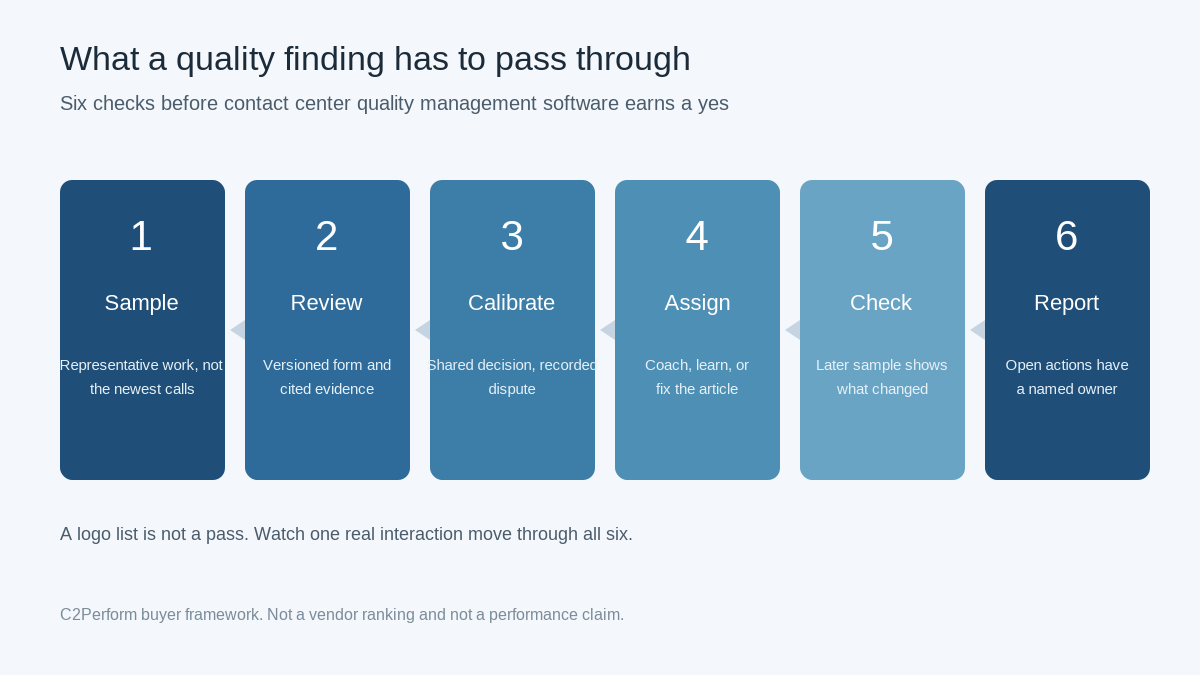
Leaders do not need another dashboard of averages. They need to see which findings are still open, which team owns them, and whether a later sample moved. IT needs the same system to respect roles. A quality form, a knowledge article, and a coaching note do not all belong to the same editor.
Ask for a report that a QA manager and an operations leader can both use. At a minimum it should show volume reviewed, calibration status, disputes, actions assigned, actions completed, and a later-sample result. C2Perform offers interactive quality views in C2View and can export data for a business-intelligence tool the company already uses. Coaching analytics sit in the same family of views, so a leader can see the session and the quality result together.
Permissions are part of the same test. Knowledge articles should show version history and who changed them. Forms should keep prior versions attached to old reviews. Role-based access should let a site lead see their teams without seeing another client's work, which matters for BPO and multi-site operations. The guide to knowledge base version control explains why regulated teams care. Confirm the software actually stores that history.
Multi-site programs add one more check. The same form should be usable across locations, with local examples in calibration, without letting each site invent a private standard. See multi-site contact center quality assurance for the operating questions, then ask the vendor to show one form shared by two teams with separate permissions.
Contact center quality management software should complement the systems a team already paid for. It should not ask the operation to rip out the phone platform, the CRM, or the workforce management tool. The buying mistake is accepting a logo slide as proof. A connection that syncs names but cannot pass a quality result into coaching has not closed the loop.
C2Perform's integrations include Salesforce, Zendesk, Microsoft Teams, Talkdesk, Five9, NICE inContact, Genesys, RingCentral, 8x8, Twilio, Oracle, and SAP, among others. Enterprise deployments can also connect third-party QA platforms so an automated review can feed an action instead of stopping at a score. IT should still test the customer's own stack. A listed partner is not the same as the customer's tenant, permissions, and data map.
Run one workflow in the proof of concept:
Then test failure, not only success. Remove a permission, change a form version, and end the session halfway. The record should still show who did what. Teams comparing broader performance suites can read contact center performance management software separately. This test stays on the quality loop.
IT leaders evaluating fit can also use the notes written for IT professionals. Operations leaders have a matching page at operations leaders. Bring both groups to the same demo. A tool that only one of them can administer will stall after kickoff.
Split the demo by owner so it does not become a feature tour. Quality assurance owns the form, the sample, calibration, and disputes. Operations owns the action, the supervisor workload, and whether employees can see the why. IT owns identity, permissions, retention, and the path back to systems the company already runs.
Use the checks below in the proof of concept. A pass means you watched it happen with your data. A miss means the step still depends on email, a spreadsheet, or a person's memory.
| Check. | Pass. | Miss. |
|---|---|---|
| Sample. | Filtered queue. | Newest calls only. |
| Form. | Version plus evidence. | Generic scorecard. |
| Calibration. | Saved shared decision. | Slide notes. |
| Dispute. | Recorded outcome. | Side chat. |
| Coaching. | Session and reply. | Email handoff. |
| Learning. | Course on the finding. | Separate login. |
| Knowledge. | Version and owner. | Shared drive. |
| Reporting. | Open actions listed. | Average only. |
| Permissions. | Role based history. | Shared admin. |
| Systems. | One live case. | Logo slide. |
A short list of vendor claims is not the same as this table. The call center quality assurance software guide is the right place for QA-tool capabilities and scoring workflow. Use that page to judge what the scoring tool should do. Use this page to judge whether the quality program can run from sample to completed action.
Two program guides help the people who will live with the decision. Building a better quality assurance program covers how to design the program. The limits of spreadsheets for QA covers why a shared workbook fails once more than one team reviews work. Neither page is the software evaluation.
Frontline leaders will feel the choice first, because they run the sessions. Share the demo notes with frontline leaders and with quality assurance professionals before you sign. If supervisors cannot finish a coaching follow-up inside the tool, the program will slip back to inboxes within a month.
Recognition belongs in the same loop. Business rules on the quality side can celebrate a strong evaluation automatically, and engagement tools cover badges, surveys, and journeys so the response is not only corrective. Talent workflows, including goals and performance plans, live with talent management. Coaching that ignores a performance plan is incomplete. The software should let a supervisor see that context, not only the latest QA form.
A QA tool can be excellent at forms, sampling, and speech analytics and still leave the next step in email. Quality management software is the layer that connects the score to an owner. Many teams keep an existing automated QA tool and connect it to that layer. C2Perform is built to complement those systems, including third-party QA platforms on enterprise deployments, rather than replace the contact center platform itself.
Scoring every interaction creates a pile of data without a plan. Ask the vendor how you would draw a sample by queue, channel, and tenure, and how you would add a targeted review when a risk rule fires. Automated selection can feed the queue. A person should still apply the standard. Fully automated scoring is not a substitute for that judgment.
Confirm the integration against your tenant, not a partner logo. C2Perform connects with common CCaaS and CRM platforms and can pass results into coaching, learning, and knowledge. The IT test is whether permissions, version history, and the employee record survive that handoff. If the demo cannot finish the loop on your data, the integration is not ready.
A quality-only purchase often dies when supervisors will not use the workflow. An IT-only purchase often dies when the form does not match the work. Put the QA manager, an operations leader, and the integration owner in the same proof of concept, and give each the checks in the table above. Frontline supervisors should try one coaching follow-up before the decision meeting.
Bring one real queue, one contested review, and the systems you already run. A C2Perform demo can show sampling, calibration, and the handoff into coaching, learning, or a knowledge update, then the report a leader would actually use.


What is knowledge management in a contact center? It is the ongoing practice of capturing reliable operational knowledge, organizing it, and helping employees find and apply it during their work. It connects people, approved information, and repeatable processes so an agent can give the right...