
 English
 Español
Claims Processing Systems: A Rollout Plan
A claims processing systems rollout guide covering workflow readiness, knowledge migration, role-based learning, QA governance, and adoption.
Read More
Master the call center troubleshooting process with this 5-step guide. Improve first call resolution and support your team with proven troubleshooting strategies.

Your contact center is likely full of data from your CRM, quality assurance platform, and other tools. Yet, agents may still struggle to find the right answer when a customer is on the line. The problem isn't a lack of information; it's the absence of a system to connect it all. A unified call center troubleshooting process acts as the operational engine that turns scattered data into actionable steps. It integrates your knowledge base, customer history, and performance feedback into a single, streamlined workflow. This gives agents a clear, reliable method for solving problems, ensuring they can use your technology to its full potential and deliver fast, accurate resolutions.
A call center troubleshooting process is a structured, step-by-step guide that agents follow to identify, diagnose, and resolve customer issues. Think of it as a reliable roadmap that prevents agents from getting lost while trying to help a customer. Instead of guessing what to do next, they have a clear path to follow. This systematic approach is the foundation of effective support, ensuring that every customer receives the same high standard of care, regardless of which agent they speak to.
This isn't about turning agents into robots who read from a script. It's about giving them a framework that handles the procedural heavy lifting. This frees them up to focus on what truly matters: actively listening to the customer and applying their critical thinking skills to solve the problem. When you remove the guesswork, you create an environment where both agents and customers feel more confident and supported. A solid process turns complexity into consistency, which is the secret to a high-performing contact center.
Having a standardized troubleshooting process is one of the most effective ways to create consistency across your team. When everyone follows a clear, structured method, it helps them solve issues more efficiently and with greater accuracy. This consistency is a game-changer for the customer experience. Customers receive a predictable and reliable level of service, which builds trust in your brand.
For agents, a standardized process removes ambiguity and stress. They know exactly what steps to take, which questions to ask, and where to find the information they need. This is especially helpful for new hires who are still learning the ropes, but it also keeps seasoned agents sharp and aligned. By equipping your team with a single, accessible source of truth, like a central Knowledge Management system, you empower them to resolve problems with confidence instead of confusion.
First Call Resolution (FCR) is a critical metric for any contact center. It measures the percentage of customer issues that are completely resolved during the first interaction, eliminating the need for a follow-up call or email. A strong FCR rate, typically benchmarked between 70% and 75%, is a direct indicator of your team's efficiency and effectiveness. More importantly, it’s a powerful driver of customer satisfaction. After all, no one enjoys having to call back multiple times to fix the same problem.
A well-defined troubleshooting process has a direct and positive impact on your First Contact Resolution rate. When agents have a clear set of steps to follow, they can quickly and accurately diagnose the root cause of an issue. This structured approach ensures they don't miss key details or skip important diagnostic steps, leading to faster, more accurate solutions. By solving the problem correctly the first time, you not only improve a key performance metric but also leave the customer feeling heard and valued.
Even with a perfect process on paper, your agents are on the front lines dealing with complex issues and real human emotions. Troubleshooting isn't just a technical skill; it's a high-stakes balancing act. Agents have to diagnose a problem, calm a frustrated customer, and manage multiple systems, all while a clock is ticking. When they run into roadblocks, it doesn't just affect their morale; it directly impacts your First Call Resolution (FCR) rates, customer satisfaction, and overall efficiency. These aren't minor inconveniences; they are significant operational drags that can define your contact center's performance.
Understanding these common hurdles is the first step toward building a support structure that truly helps your team succeed. Many of the challenges agents face aren't due to a lack of effort but a lack of the right tools and support. From dealing with customer anger to searching for a single piece of information across a dozen browser tabs, these daily struggles add up. By identifying them, you can start to implement systems and training that remove friction from the troubleshooting process, making life easier for your agents and creating better outcomes for your customers. Let's look at some of the most frequent challenges your team is likely up against.
It’s incredibly difficult for an agent to stay calm and helpful when a customer is upset. A frustrated customer isn't just sharing their problem; they're often expressing anger, disappointment, and stress. This puts the agent in a defensive position, making it harder to listen actively and gather the details needed to solve the issue. The conversation can quickly become about managing emotions rather than diagnosing a technical problem. This emotional labor is draining and can lead to agent burnout. Providing your team with dynamic coaching on de-escalation techniques and empathy is crucial, as it equips them to guide the conversation back to a productive, solution-focused path.
Agents often feel like digital acrobats, forced to jump between different programs that don't communicate with each other. They might have the CRM open on one screen, a knowledge base in another tab, and a separate system for order history. This "swivel chair" effect slows everything down. Every time an agent has to switch contexts and manually search for information, it adds precious seconds to the handle time and increases the chance of errors. This inefficiency is just as frustrating for the agent as it is for the customer waiting on the line. A unified platform that connects these disparate systems is essential for streamlining their workflow and giving them a single view of the customer.
Nothing stalls a troubleshooting process faster than an agent’s inability to find a reliable answer. When information is scattered across shared drives, outdated documents, or buried in long email chains, agents lose confidence in their ability to provide accurate solutions. This directly harms your FCR rate. A centralized and well-maintained knowledge management system is non-negotiable. It serves as the single source of truth, ensuring that every agent has instant access to the most current, approved information. For teams in regulated industries, features like version control become critical for compliance, as they provide a clear audit trail for all content changes.
When a customer calls with a problem, every agent wants to find a solution quickly. But jumping straight to answers without a clear plan can lead to confusion, longer calls, and frustrated customers. A standardized troubleshooting process gives your agents a reliable roadmap to follow for every interaction. It helps them stay calm under pressure, diagnose issues accurately, and guide customers to a resolution with confidence. Think of it as a framework that provides structure while still allowing for the flexibility and empathy needed to handle unique customer situations.
Following a consistent process does more than just fix technical glitches; it builds trust. When customers feel they are in capable hands, their frustration eases, and their loyalty deepens. This structured approach empowers agents to take ownership of the problem-solving journey from start to finish. By implementing these five steps, you can transform challenging support calls into positive experiences that strengthen customer relationships and improve your team's performance. The goal is to make troubleshooting less of a frantic search for answers and more of a methodical, reassuring path to a solution. It ensures every agent, from a new hire to a seasoned veteran, has the tools to deliver a consistent and high-quality support experience, which is a cornerstone of excellent customer service.
The first and most important step in any troubleshooting process is to simply listen. Before you can solve a problem, you have to fully understand it from the customer’s perspective. Active listening means giving the customer your full attention, not just waiting for your turn to talk. Let them explain the situation in their own words without interruption. As they speak, take notes on the essential details: What were they trying to accomplish? What exactly happened? Did any error messages appear? This initial information is the foundation for your entire investigation. Good troubleshooting helps customers faster, and it all starts with making them feel heard and understood from the very beginning.
Once you have the customer's initial story, it's time to become a detective. Your next step is to ask smart, clarifying questions to fill in any gaps. This is where you move from passively listening to actively guiding the conversation. Start with open-ended questions like, "Can you walk me through the steps you took before the error occurred?" to get a broader picture. Then, use targeted, closed-ended questions to zero in on specifics, such as, "Are you using a Mac or a PC?" Asking for details like screenshots or exact error codes can also be incredibly helpful. A dynamic coaching program can equip your agents with effective questioning techniques to gather the right information efficiently without frustrating the customer.
With all the key details and answers in hand, you can now start to diagnose the problem. This step involves forming an educated guess, or a hypothesis, about what’s causing the issue. Based on the evidence, what do you believe the root cause is? A great technique here is to try and isolate the issue. For example, if a customer is having trouble with a web-based application, you might ask them to try it in a different browser. This simple test can quickly tell you if the problem is browser-specific or something else entirely. The goal is to systematically rule out possibilities until you pinpoint the true source of the problem, not just one of its symptoms.
Before you confidently tell a customer you have the fix, it’s crucial to test your solution. This step is your internal quality check, and it can save both you and the customer a lot of time and frustration. If you have a test environment, try to replicate the issue and see if your proposed solution works. If not, you can mentally walk through the steps or double-check them against an article in your knowledge management system. Presenting a solution that doesn't work erodes trust and often results in a follow-up call. By verifying your fix first, you ensure the guidance you provide is accurate, effective, and will resolve the issue on the first try.
After confirming your solution works, it’s time to guide the customer through the resolution. Clearly and simply explain the steps they need to take. Once they’ve implemented the fix, don't just end the call. Stay on the line and ask them to confirm that the issue is truly resolved. This is what it means to "close the loop." It shows the customer you’re invested in their success. Finally, ask, "Is there anything else I can help you with today?" This simple question can prevent future calls and leaves the customer feeling cared for. Make sure to document the problem and solution in your system to help your teammates and ensure a consistent experience.
Getting to the heart of a customer’s problem is the most critical part of the troubleshooting process. If an agent misdiagnoses the issue from the start, the rest of the interaction is spent chasing the wrong solution, leading to frustration for everyone involved. True accuracy isn’t just about hearing the customer’s words; it’s about understanding their intent and the context of their problem. By equipping your team with the right strategies and tools, you can build a consistent process for identifying issues correctly the first time, which is a huge step toward improving first call resolution.
A structured questioning framework helps agents gather the right information without sounding like robots. Instead of a rigid script, this is about teaching your team how to ask effective questions. Start with open-ended questions to understand the big picture, like, "Can you walk me through what you were trying to accomplish?" Then, use closed-ended questions to zero in on specifics. It's helpful to find out what the customer is trying to do and what happens instead, even asking for screenshots if possible. A great Knowledge Management system can support this by providing agents with dynamic question trees and guides to help them systematically diagnose the issue based on the customer's answers.
Nothing frustrates a customer more than having to repeat their story every time they speak to a new agent. Your CRM and interaction history are invaluable tools for preventing this. When an agent can see a customer's entire history, including past calls, chats, and resolved issues, they gain immediate context. This allows them to skip the repetitive questions and get straight to the heart of the current problem. This practice shows the customer you value their time and are paying attention to their journey with your company. A platform that provides a connected quality assurance view gives agents a 360-degree perspective, turning historical data into a powerful tool for faster, more empathetic problem-solving.
Escalating an issue isn't a sign of failure; it's a mark of an efficient and collaborative team. No single agent can know everything, and empowering them to recognize when they need help is crucial for quick resolutions. Create clear guidelines for when and how to escalate a problem. This could involve consulting a more senior agent, a team lead, or an expert in another department. Colleagues in other departments might have specialized knowledge that can crack a tough problem. A seamless Communications Hub makes this process much smoother, allowing agents to quickly ping an expert for advice without leaving the customer waiting for long periods. This turns a potential roadblock into a collaborative win.
Having a structured troubleshooting process is a great start, but turning that process into a consistent, high-performing engine requires a commitment to best practices. These are the habits and systems that support your agents, improve efficiency, and ultimately create better customer outcomes. It’s about moving beyond a simple checklist and building a culture of excellence around problem-solving. When you empower your team with the right tools and a supportive environment, troubleshooting becomes less about just fixing a single issue and more about strengthening the entire customer relationship.
These practices focus on both the human side of service and the operational mechanics that make great service possible. By blending empathy with efficient systems, you create a framework where agents feel confident and customers feel heard. This approach also ensures that the valuable insights gained from every interaction are captured and used to make the whole organization smarter. Implementing these best practices helps transform your troubleshooting process from a reactive necessity into a proactive tool for continuous improvement and stronger agent engagement.
Scripts are essential for ensuring consistency and compliance, but they shouldn't be a cage. The most effective agents know when to set the script aside and connect with the customer on a human level. Encouraging your team to show genuine empathy can completely change the tone of a difficult conversation. When an agent acknowledges a customer's frustration or makes a small personal connection, it shows the customer they are being treated as an individual, not just another ticket number. This simple act builds rapport and trust, making the customer more willing to cooperate with the troubleshooting steps. Dynamic coaching can help agents develop the soft skills needed to balance scripted processes with authentic, empathetic interactions.
An agent’s ability to troubleshoot effectively is directly tied to the quality of the information they can access. Even the most skilled agent will struggle if they’re working with outdated or incorrect product details. A centralized and meticulously maintained knowledge management system is non-negotiable. When agents trust that their knowledge base has the right answer, they can provide solutions with confidence and speed. This is especially critical in regulated industries where version control and accuracy are paramount. An outdated article doesn't just lead to a poor customer experience; it can create serious compliance risks. Make sure your content is reviewed and updated regularly, so your team always has reliable information at their fingertips.
Documenting the troubleshooting process might feel like an administrative task, but it’s one of the most important steps. Recording the customer's issue, the steps taken to diagnose it, and the final resolution creates an invaluable record. This documentation helps other agents who may encounter a similar problem in the future, reducing the time it takes to find a solution. It also provides a clear history for quality assurance reviews and coaching sessions. When you document interactions consistently, you build a rich database of insights that can be used to identify recurring issues, inform training programs, and refine your overall support strategy.
The troubleshooting process doesn't end when the call is over. Every interaction is an opportunity to learn and improve. The insights your agents gather are incredibly valuable, but only if they are shared with the rest of the organization. Establish a clear process for agents to report product bugs, suggest process improvements, or highlight recurring customer complaints. This feedback loop should connect your support team with other departments like product development and engineering. By sharing what you learn, you can help address the root cause of problems, preventing future customers from experiencing the same issue. A central communications hub can make it easier to share these insights across teams and ensure they lead to meaningful action.
Having a great process is one thing, but your agents need the right tools to execute it effectively. When your tech stack is integrated and intuitive, agents can stop fighting with their software and focus on helping customers. A disjointed system, with information scattered across different platforms, creates friction for your team and a frustrating experience for your customers. The goal is to create a seamless workflow where agents have everything they need right at their fingertips. This means fewer clicks, less time searching for information, and more time dedicated to active problem-solving.
Equipping your team with the proper resources not only speeds up resolution times but also gives them the confidence to handle complex issues. When agents feel supported by their tools, they are better prepared to solve problems on the first try, which directly impacts your First Call Resolution rate. This isn't just about having fancy software; it's about creating an environment where efficiency and accuracy are the default. The right combination of tools empowers agents to move from simply answering calls to truly resolving issues. Let's look at the essential tools that make efficient troubleshooting possible and how they work together to support your team.
Nothing frustrates a customer more than having to repeat their story every time they speak to a new agent. A well-integrated CRM and knowledge base are your first line of defense against this common problem. Your CRM should allow agents to instantly see a customer's entire interaction history, giving them the context they need to pick up right where the last conversation left off. This simple step shows the customer you value their time.
A centralized Knowledge Management system is just as important. It serves as the single source of truth for product information, policies, and troubleshooting guides. When agents can find accurate, approved answers in seconds, they can resolve issues faster and improve First Call Resolution rates. Using technology to keep track of customer interactions and provide consistent information is fundamental to a great customer experience.
Sometimes, the hardest part of troubleshooting is understanding what the customer is actually seeing. Descriptions can be vague or confusing, leading agents down the wrong path. Diagnostic and screen-sharing tools remove the guesswork by allowing your agents to see the problem firsthand. With the customer's permission, an agent can view their screen to identify the issue in real time.
These tools are incredibly effective for technical support, where visual context is key. Instead of a lengthy back-and-forth of questions, the agent can quickly pinpoint the error, guide the customer through the fix, or even take control to resolve it for them. This helps your team get details quickly and accurately, turning a potentially long and frustrating call into a quick and successful one.
Troubleshooting is a skill that improves with practice and targeted feedback. While live calls offer real-world experience, a dedicated platform for training is where agents can refine their approach in a supportive environment. A Learning Management system allows you to build a library of training materials, from troubleshooting simulations to modules on handling difficult conversations with empathy.
The real power comes from connecting performance data to training. When a quality review or a live call reveals a knowledge gap, a Dynamic Coaching platform can automatically assign a relevant micro-learning module to that agent. This turns every interaction into a development opportunity, creating a continuous feedback loop that drives real improvement. Instead of just identifying problems, you’re actively providing the resources to solve them.
A documented troubleshooting process is a great start, but it’s your team’s ability to execute it that truly makes a difference. Great troubleshooters aren’t born; they’re developed through consistent, targeted training that builds both their technical skills and their confidence. When you invest in your agents' development, you’re not just teaching them a series of steps. You’re empowering them to think critically, handle pressure with grace, and take ownership of customer outcomes. This shift is crucial because even the best process falls flat if the person implementing it feels uncertain or unsupported.
Effective training moves beyond one-off sessions and becomes part of your contact center’s culture, creating a continuous cycle of learning and improvement. It’s about creating an environment where agents feel safe to practice, make mistakes, and grow. By combining hands-on practice, holistic coaching, and data-driven feedback, you can equip your team with the skills they need to solve complex problems efficiently. This approach transforms troubleshooting from a reactive task into a proactive skill. Ultimately, investing in training leads to better resolutions for your customers, higher first call resolution rates, and a more engaged, capable team that feels valued and prepared for any challenge.
The best way to get good at troubleshooting is to actually do it, and a training environment is the perfect place to practice without pressure. Role-playing with real-world customer problems allows agents to walk through the troubleshooting steps, test their questioning techniques, and build muscle memory in a safe setting. This hands-on practice is invaluable for building confidence. Pairing newer agents with experienced mentors also provides a powerful learning opportunity, offering guidance and support in real time. A structured Learning Management system can help you organize these activities, delivering scenarios and tracking progress so agents can master the art of troubleshooting before they ever face a difficult live call.
Troubleshooting is as much about mindset as it is about method. An agent who believes they can solve a problem is far more likely to succeed. That’s why effective coaching must go beyond analyzing a single interaction. Instead of just reviewing a quality score, Dynamic Coaching focuses on the whole person. It considers an agent’s long-term development, their personal strengths, and their career aspirations. This holistic approach helps agents see themselves as capable problem-solvers and fosters a sense of ownership over their performance. When you coach the person, not just the call, you build a resilient and empowered team that is ready to tackle any challenge.
Quality assurance data is full of potential, but it’s only useful if you use it to drive meaningful change. Instead of letting QA scores sit in a report, you can use them as a starting point for targeted improvement. A Connected Quality Assurance platform helps you transform insights into action. For example, if several agents struggle with a specific issue, you can automatically assign a relevant eLearning module or use the data to inform a team-wide coaching session. This practice closes the loop between identifying a performance gap and providing the exact support needed to fix it, ensuring that every piece of feedback contributes to tangible skill development.
You can't improve what you don't measure. A solid troubleshooting process feels great in theory, but you need the data to prove it's working and to find opportunities for improvement. Tracking the right key performance indicators (KPIs) gives you a clear picture of your team's effectiveness. These metrics help you understand everything from agent efficiency to customer happiness, showing you exactly where your process shines and where your team might need more support. By focusing on a few key metrics, you can get a holistic view of how well your troubleshooting framework is performing and make data-driven decisions to refine it.
This isn't about micromanaging your team; it's about equipping them with the right support and tools to succeed. When you can pinpoint specific challenges, like a recurring issue that tanks FCR or a knowledge gap that leads to escalations, you can provide targeted training or update your resources. This data-driven approach transforms quality assurance from a simple check-the-box activity into a powerful engine for continuous performance improvement across your contact center. It allows you to connect the dots between an agent's actions, the tools they use, and the final customer outcome. This clarity is essential for building a resilient and high-performing team that consistently resolves issues and leaves customers feeling satisfied.
First Contact Resolution (FCR) is the gold standard for measuring troubleshooting success. It tracks the percentage of issues resolved in a single interaction, meaning the customer doesn't have to call back. A high FCR shows your agents are diagnosing problems correctly and providing effective solutions the first time. This is where having a centralized Knowledge Management system becomes a game-changer, equipping agents with the right information instantly. While Average Handle Time (AHT) is also important, it's best viewed alongside FCR. Rushing an agent to meet a low AHT target can lead to unresolved issues and repeat calls, which hurts both FCR and customer satisfaction. The goal is efficient and effective resolution, not just speed.
Ultimately, the goal of troubleshooting is to leave the customer feeling heard and helped. That's why Customer Satisfaction (CSAT) is a vital KPI. As Help Scout notes, great problem-solving leads to excellent service that makes customers happy. On the flip side, a high escalation rate is a red flag. If agents are constantly passing issues up the chain, it may signal gaps in your training or that they can't find the information they need. This is an area where targeted Dynamic Coaching can make a huge difference. Finally, keep an eye on your abandonment rate. If customers are hanging up before they even reach an agent, it suggests long wait times are creating frustration before the troubleshooting process even begins.
As your team grows, you can’t rely on every agent to develop their own troubleshooting methods. What works for a team of five can become chaotic for a team of fifty. This is where a scalable framework comes in. Think of it not as a rigid script, but as a shared playbook that gives your agents a consistent, reliable path to follow for every issue. This consistency is a game-changer for the customer experience and makes onboarding new hires significantly smoother.
A strong framework breaks the process into clear, manageable steps. Using a structured methodology helps agents move from identifying the true root cause of a problem to testing and verifying a solution. It gives them the confidence to handle complex issues because they have a process to lean on. This approach moves your team away from just fixing one-off symptoms and toward implementing lasting solutions that prevent the same problem from happening again.
The real power of a scalable framework is its ability to grow with your team. The key is to document every solution and insight. When an agent discovers a new fix, that information shouldn't stay with them. It needs to be captured and shared. This is why an effective framework is always supported by a dynamic Knowledge Management system. By documenting fixes and sharing what you’ve learned, you create a living resource that makes the entire team smarter and more efficient. It turns individual successes into collective knowledge, ensuring your troubleshooting process only gets better over time.
My agents are experienced and know our products well. Won't a standardized process just slow them down? That's a great question, and it's a common concern. The goal of a standardized process isn't to turn your expert agents into robots or to micromanage them. Instead, think of it as a reliable framework that handles the procedural heavy lifting. This frees up their mental energy so they can focus on what they do best: actively listening to the customer and applying their critical thinking skills to solve complex problems. It also ensures every customer gets a consistent, high-quality experience, no matter how unique their issue is.
How do I get my team to actually follow a new troubleshooting process? Getting your team on board starts with making the process easy and showing them how it helps. If the process requires them to juggle multiple programs or search through messy folders, they'll quickly find workarounds. The key is to support the process with integrated tools, like a central knowledge base that gives them answers in seconds. You can also use coaching to reinforce the new habits, focusing on how the process leads to better customer outcomes and less stress for them. When agents see that the process makes their job easier, adoption will follow naturally.
Our knowledge base is a mess and nobody trusts it. Where should we even begin to fix it? You're not alone; this is a very common challenge. The best way to tackle a messy knowledge base is to start small. Begin by identifying the top 10 or 20 articles that are used most frequently or that relate to your most common issues. Focus on updating and verifying just those articles first. It's also helpful to assign clear ownership for different content areas and to set up a simple schedule for regular reviews. The goal is to build trust in the system again, and that happens one accurate, easy-to-find article at a time.
Should I be more focused on improving First Call Resolution (FCR) or reducing Average Handle Time (AHT)? It's tempting to see these two metrics as a trade-off, but it's more effective to view them as partners. Pushing agents to reduce their handle time at all costs often leads to rushed, incomplete solutions and repeat calls, which hurts your FCR and customer satisfaction. A strong troubleshooting process helps agents be both efficient and effective. By giving them a clear path and the right information, they can diagnose issues accurately and resolve them correctly the first time, which naturally leads to better FCR without unnecessarily long calls.
How does a better troubleshooting process help with agent burnout? A clear, supportive process is one of the best tools for reducing agent burnout. Much of the stress agents feel comes from uncertainty, like not knowing the right answer or how to handle a frustrated customer. A structured process removes that guesswork. When agents feel confident that they have a reliable method to follow, easy access to correct information, and the training to handle difficult conversations, their cognitive load decreases. It removes friction from their day and empowers them to feel successful, which is crucial for long-term engagement.
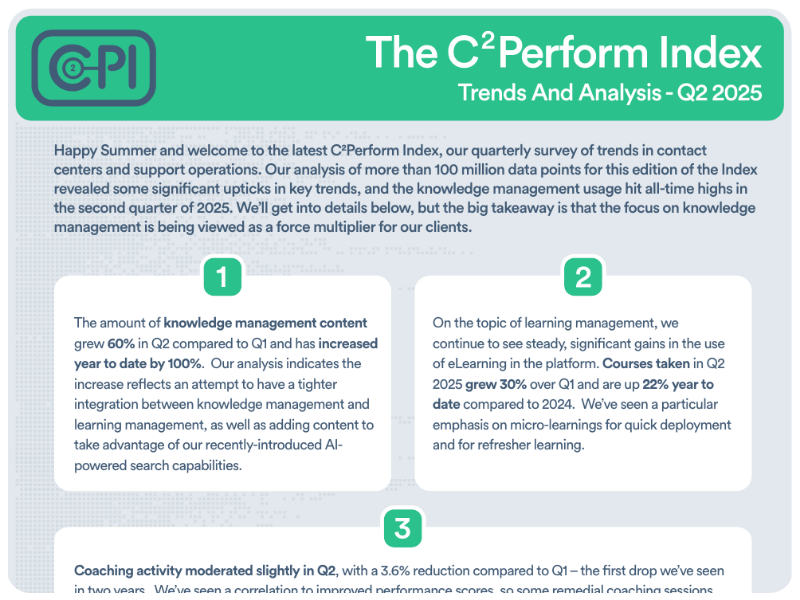
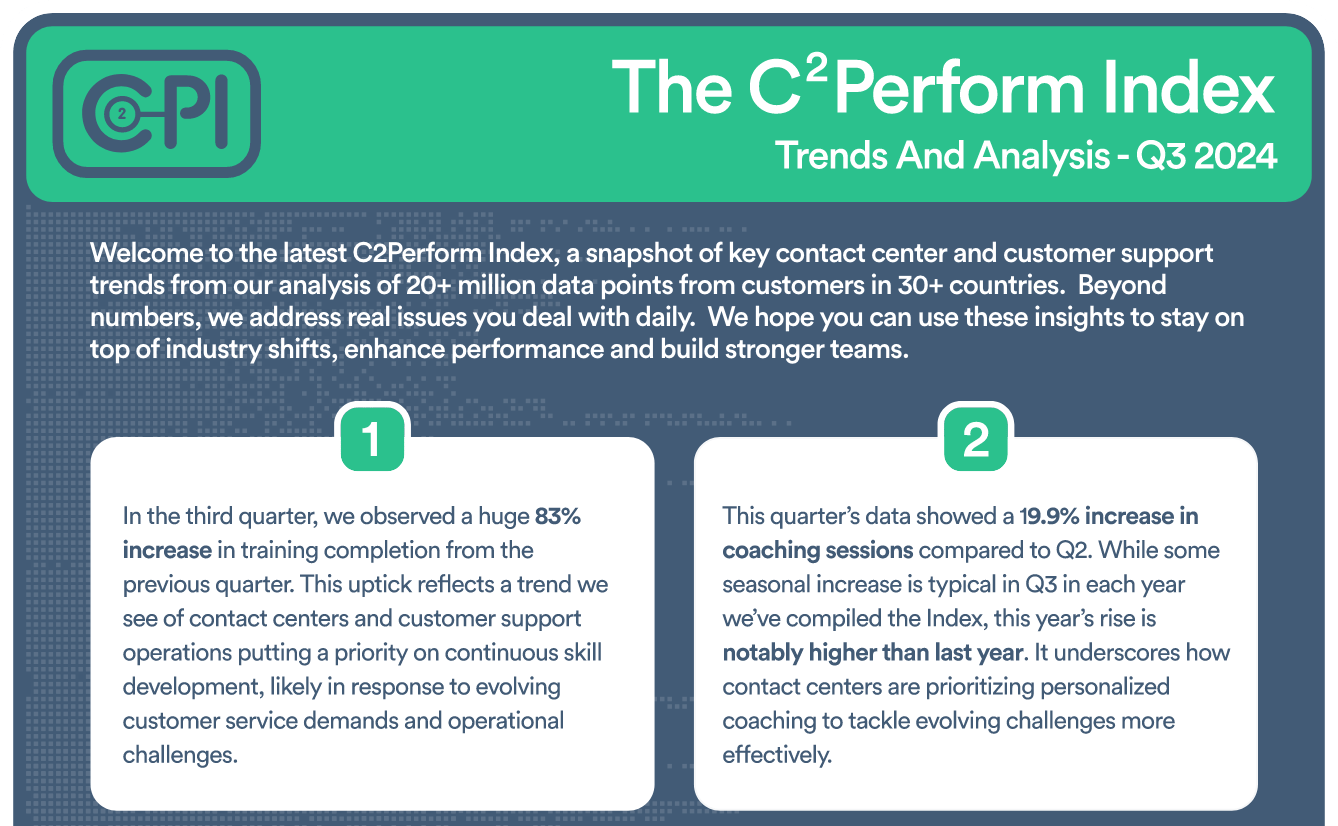
Insightful Analysis on Contact Center and Customer Support Trends

Check out our eBook, New Thinking About an Old Problem


Join contact center and customer support professionals around the world who can’t wait to see the C2PI every quarter.


300 Colonial Center Drive, Suite 100
Roswell, GA 30076
Copyright © 2026 C2Perform. All Rights Reserved. Privacy Policy Acceptable Use Policy